 illustration
16:9
illustration
16:9
Comic Script Prompt Reference for Stories and Articles
Subject
A detailed structure and plot design for an original knowledge-biography comic of several pages plus a cover page, turning an article or story into a comic-script prompt reference.
Composition
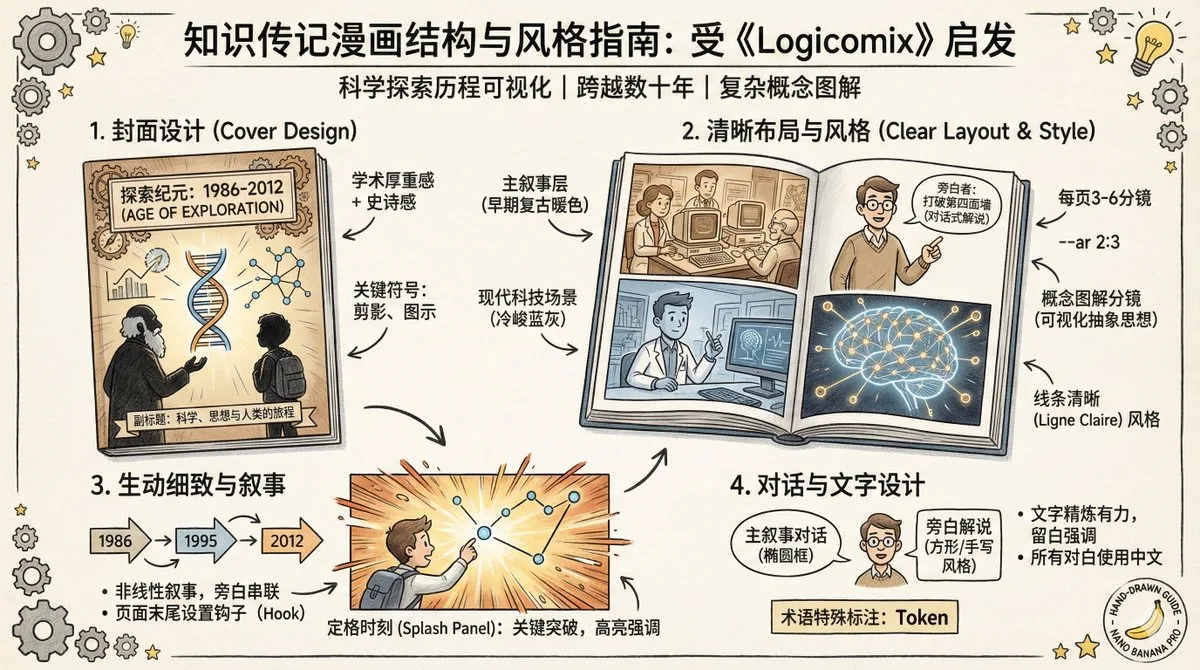
Per-page layout described page by page; cover plus pages 1 to N; 3-6 panels per page, distinguishing the 'main narrative layer' (historical events) from the 'narrator layer' (commentary); reserve 'concept-diagram panels' for complex ideas; annotate each panel's rough proportion (full page, half, 1/3, small cell); page aspect ratio --ar 2:3; key beats use freeze-frame splash panels or double-page spreads.
Lighting
Light-and-shadow mood specified per panel as part of the visual detail.
Setting
Spans scientific-exploration journeys across decades; visually distinguish eras via costume, hairstyle, equipment and environmental color tone.
Style
Logicomix-style narrative; Ligne Claire (clear line) referencing Herge's Tintin or Joost Swarte - even clean outlines, realistic detailed backgrounds, slightly cartoonish but recognizable characters; color-layered storytelling (yellowed retro warm tones for early eras, cold blue-gray for modern tech scenes, high-saturation bright accents for breakthroughs); breaking the fourth wall with narrator characters who address the reader.
Details
Cover: academic-weighty yet attractive, knowledge/science-themed title typography, composition hinting at the core theme with key-figure silhouettes or iconic symbols, with subtitle or time span (e.g. '1986-2012') for epic feel. Dialogue: main layer standard oval bubbles, narrator square or handwritten-style boxes; captions at frame edges; bold/colored first-use of scientific terms; concise text, all dialogue in Chinese. Non-linear narrative with page-end hooks. This stage outputs only detailed layout and plot; each panel description must be specific enough to serve directly as an image-generation prompt. Example reference tweets and sample script/drawing conversations provided. Tip: place the most important visual element at the start of the prompt so the model prioritizes it.