 illustration
3:2
illustration
3:2
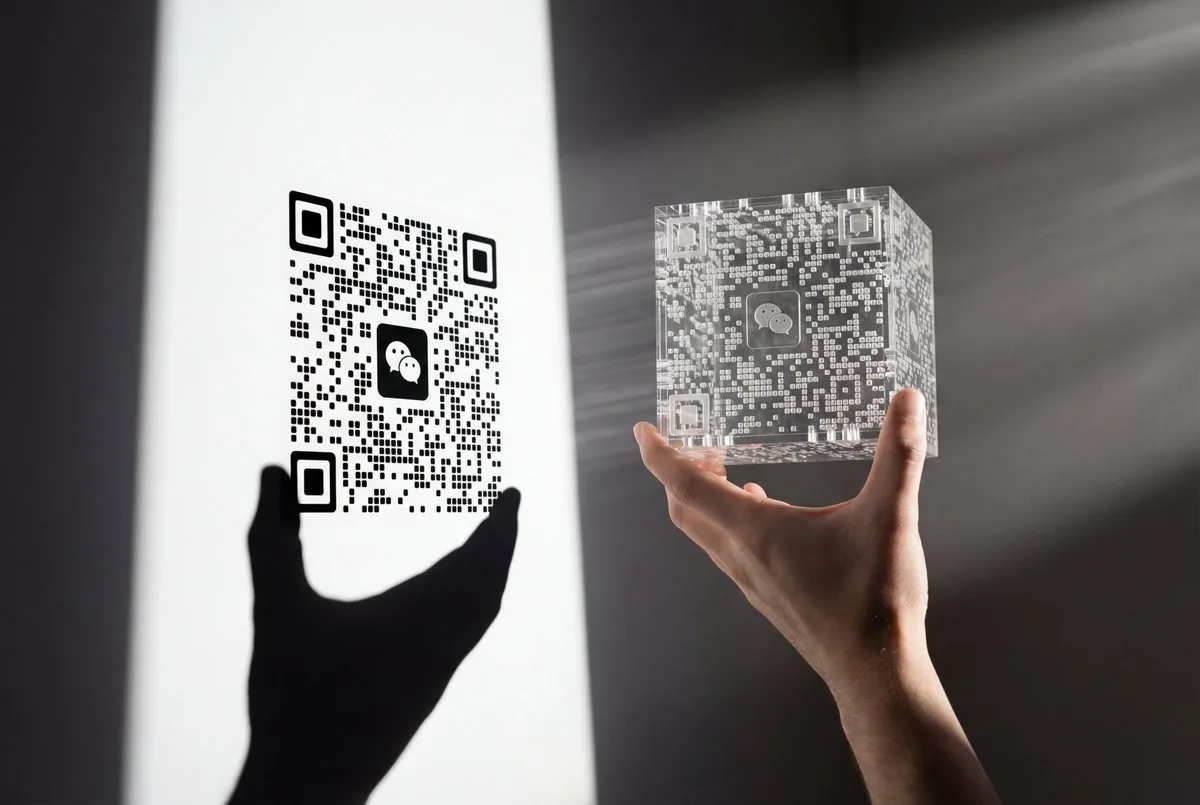
Light and Shadow QR Code: Precision of Hand and Light - Stylized Style
Subject
A male hand (natural skin tone, hairless) in the right foreground holding up a complex semi-transparent laser-cut acrylic cube / 3D-printed resin block, pinching only the front and back lower corners with two fingertips; a WeChat logo sits at the cube's center.
Composition
Right side foreground is the hand holding the object; left side is its shadow cast on a white wall set at a slanted perspective angle; the cube sits parallel to the wall in horizontal-screen vertical orientation; the hand's shadow connects to the QR code shadow on the same plane but only two fingertips support it, never covering any QR data points or pattern; a large black hand and wrist silhouette projects below and to the lower-left of the QR shadow; deep depth of field keeps hand, beam and shadow sharp.
Lighting
Single strong hard light source positioned outside the right of the frame; faint dust or haze creates a clearly visible linear volumetric light beam (Tyndall effect); a bright white cone of light projects from the acrylic block onto the wall like a projector, forming the QR pattern; sharp-edged, high-contrast pure-black shadow on pure-white wall.
Setting
A flat plain white wall background.
Style
Realistic photography; minimalist hard-light style fusing shadow art with volumetric lighting; high contrast.
Details
Use the reference image's QR code, which must remain completely unchanged and unobstructed so it scans normally; the wall shadow shows WeChat QR features: three rounded positioning squares, a clear central WeChat logo (negative-form silhouette of two speech bubbles) and rounded data-point array; the hand shadow must obey physics and match the real hand's pose. Tip: add a tiny size reference (a coin or pen) to convey the subject's scale.