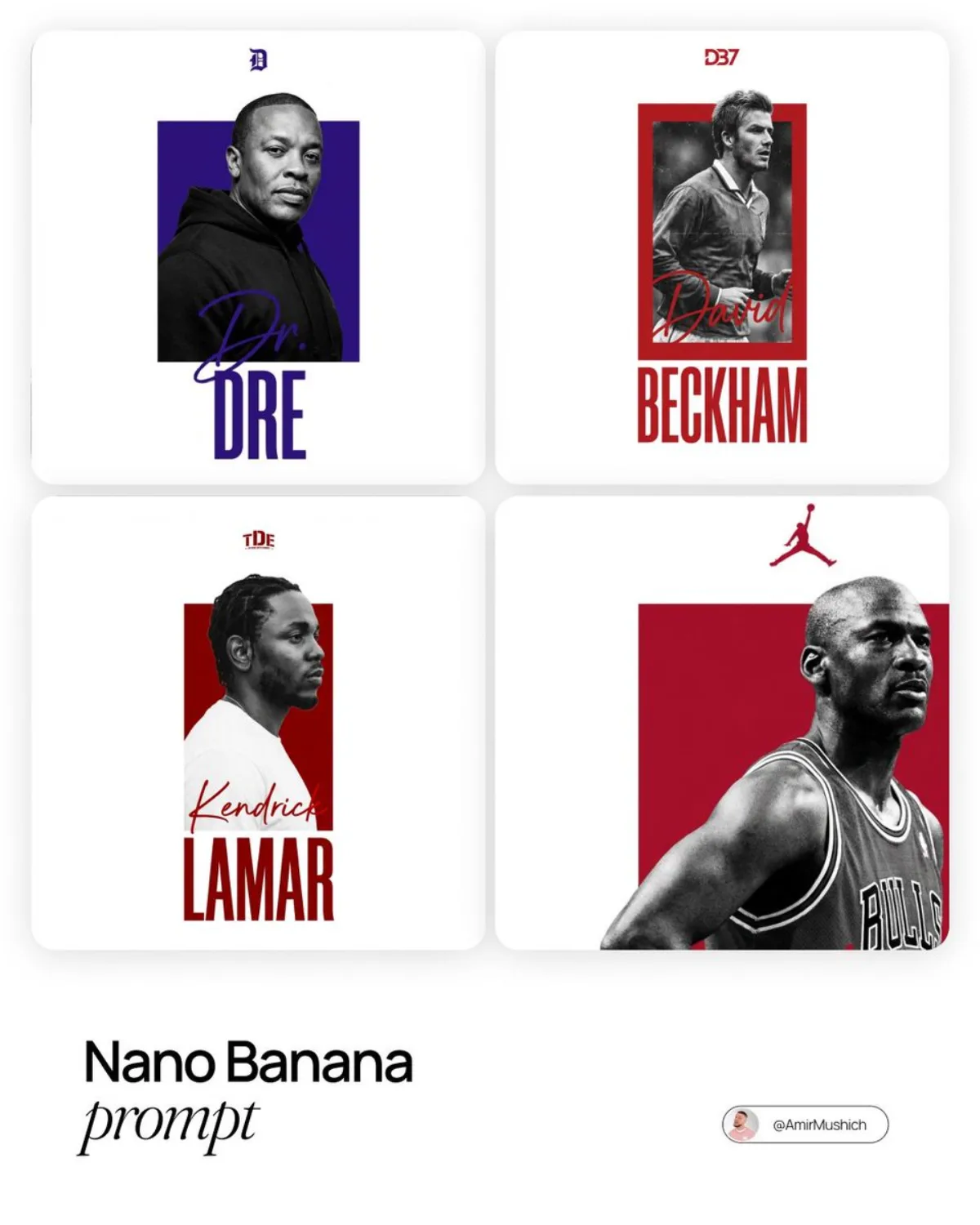
动感体育海报 海报 4:5

动感体育海报

高级 modernpostersci-fi
完整提示词
渲染要点:[PERSON] , presented as a direct uncompressed digital screen export of a flat source graphic file.

Technical & Composition Rules:

Medium (Crucial): This is native digital pixel art, NOT a photograph. The entire canvas from edge to edge is pure, seamless digital white (RGB 255,255,255). There is ZERO physical reality: no paper grain, no ink texture, no frame, no shadows, no lighting gradients, no desk/wall environment. It is a flat 2D digital rendering meant for screen display only.

Graphic Container & Color: A central, vertical, solid-color rectangle acts as a digital vector container. The color must be uniquely distinct and semantically relevant to the subject (e.g., David Beckham = classic England white/red or Man Utd red; Prince = Purple). Avoid defaulting to generic red unless justified by primary branding.

Subject Element: A high-detail, gritty black-and-white photograph of the subject is digitally masked inside and over the colored rectangle container. The subject is cropped from the chest up, preferably in a side profile or dynamic 3/4 angle. The head slightly overlaps the top edge of the colored container.

Typography (Digital Text Elements):

Last Name: Placed below the colored container in the white digital space. Rendered in a tall, compressed, bold sans-serif digital font. Color matches the container.

First Name (Contrast Rule): Layered over the subject's torso/clothing. Rendered in a loose, handwritten "signature" script style. The color matches the container, BUT it must be perfectly legible. Ensure high contrast against the underlying B&W photo pixels.

No text covers the face.

Header Element: Centered at the very top in the white digital space, place a small, iconic logo strictly associated with the subject (or their clean uppercase initials if no logo exists), matched to the container's color.。提示:增加表面纹理描述(如「细微颗粒感」「丝绸光泽」)可以拉满细节层级。
← 返回画廊

如何使用这条提示词

从复制粘贴到出图,只需 4 步。

1
复制提示词
点击上方「📋 复制完整提示词」按钮——剪贴板就有完整提示词了,「提示:」温馨贴士已自动剥离。
2
替换占位符
留意 [主体]、[品牌色]、{风格} 这样的占位符,换成你的具体内容效果更好。
3
选择宽高比
本提示词原始测试比例为 4:5。方图(1:1)适合社交分享,9:16 适合短视频/竖屏,16:9 适合 banner/封面。
4
粘贴到你的图像模型
可粘贴到 Nano Banana 2、GPT Image 2、Midjourney、Flux 2 或 DALL-E。每个模型理解会略有不同,多试 2-3 个挑最佳。

兼容的 AI 模型

本提示词在以下模型中均测试可用。点击任意徽章查看模型详情。

变体灵感

几个让这条提示词适配你的品牌/故事的小调整:

用同一构图测试三个宽高比(1:1、4:5、16:9),挑最适合你内容的画幅。
保持构图和光线不变,把主体换成你的产品、角色或品牌形象。
调整光线(黄金时刻 ↔ 工作室柔光箱 ↔ 蓝调时刻 ↔ 霓虹夜景)就能大幅改变情绪。
末尾加一个风格修饰词——例如 'shot on 85mm'、'film grain'、'编辑风 Vogue'、'电影感变形宽屏'.

常见问题

这条提示词在哪个 AI 模型上表现最佳?
四大主流模型(Nano Banana 2、GPT Image 2、Midjourney v7、Flux 2)都能很好地渲染本提示词。Nano Banana 2 在角色一致性和文字渲染方面最强;GPT Image 2 擅长多元素场景和文字排版;Midjourney 美学风格最有绘画感;Flux 2 是最强的开源选项。
这条提示词可以商用吗?
可以——AI Image Free 上所有提示词均可免费商用。卡片中的参考图是 AI 生成的视觉示例,你用这条提示词实际生成的图片归你所有(受你使用的具体 AI 模型服务条款约束)。
我怎么把这条提示词改造成我自己品牌的风格?
留意提示词中的占位符(如 [主体]、[颜色]、[品牌]),替换成你的具体内容。你也可以在提示词末尾追加自己的风格修饰词(例如「使用品牌色 #FF6B35 和 #2D3142」),打造品牌专属版本。