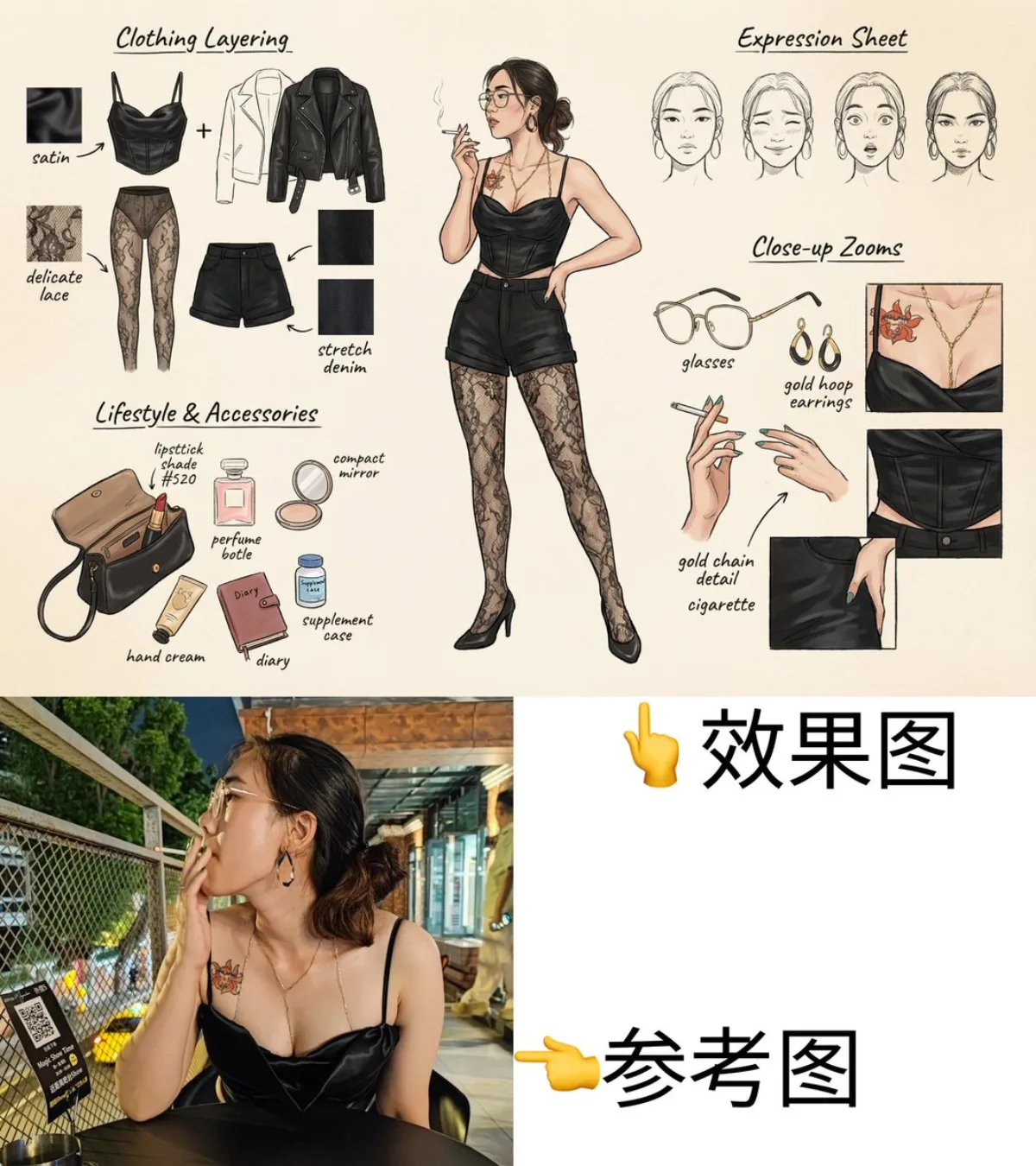
时尚概念手绘分解图 时尚 4:5

时尚概念手绘分解图

高级 hand-drawnfashionconcept-art
完整提示词
视觉概念:A fashion-style concept breakdown sheet in hand-drawn illustration style.
Center: full-body view of a stylish, confident female character with a slightly sexy vibe (not explicit), in a dynamic yet natural pose.
Surrounding: structured layout of her key components:
• Clothing layering – show outerwear, innerwear, tights (lace, sheer textures), shapewear with detailed pattern zoom-ins.
• Expression sheet – 3-4 facial expressions (neutral, shy, surprised, focused).
• Close-up zooms – textures of fabric folds, skin details, hand gestures.
• Lifestyle & accessories – open handbag with daily items: lipstick, perfume, mirror compact, hand cream, diary, supplements.
• Material annotations – handwritten-style notes beside each item (e.g., “soft lace,” “matte leather,” “shade #520”).

Background: soft beige or parchment paper texture to evoke a design sketchbook.
Lighting: clean, soft shadows to unify the scene.
Output: high-quality 2D illustration in 4K, balanced between sensuality and fashion editorial.
Language: labels in Chinese + English.。工作流:生成多张候选后再做 best-of-N 筛选,可避免一次性出图的不稳定。
← 返回画廊

如何使用这条提示词

从复制粘贴到出图,只需 4 步。

1
复制提示词
点击上方「📋 复制完整提示词」按钮——剪贴板就有完整提示词了,「提示:」温馨贴士已自动剥离。
2
替换占位符
留意 [主体]、[品牌色]、{风格} 这样的占位符,换成你的具体内容效果更好。
3
选择宽高比
本提示词原始测试比例为 4:5。方图(1:1)适合社交分享,9:16 适合短视频/竖屏,16:9 适合 banner/封面。
4
粘贴到你的图像模型
可粘贴到 Nano Banana 2、GPT Image 2、Midjourney、Flux 2 或 DALL-E。每个模型理解会略有不同,多试 2-3 个挑最佳。

兼容的 AI 模型

本提示词在以下模型中均测试可用。点击任意徽章查看模型详情。

变体灵感

几个让这条提示词适配你的品牌/故事的小调整:

用同一构图测试三个宽高比(1:1、4:5、16:9),挑最适合你内容的画幅。
保持构图和光线不变,把主体换成你的产品、角色或品牌形象。
调整光线(黄金时刻 ↔ 工作室柔光箱 ↔ 蓝调时刻 ↔ 霓虹夜景)就能大幅改变情绪。
末尾加一个风格修饰词——例如 'shot on 85mm'、'film grain'、'编辑风 Vogue'、'电影感变形宽屏'.

常见问题

这条提示词在哪个 AI 模型上表现最佳?
四大主流模型(Nano Banana 2、GPT Image 2、Midjourney v7、Flux 2)都能很好地渲染本提示词。Nano Banana 2 在角色一致性和文字渲染方面最强;GPT Image 2 擅长多元素场景和文字排版;Midjourney 美学风格最有绘画感;Flux 2 是最强的开源选项。
这条提示词可以商用吗?
可以——AI Image Free 上所有提示词均可免费商用。卡片中的参考图是 AI 生成的视觉示例,你用这条提示词实际生成的图片归你所有(受你使用的具体 AI 模型服务条款约束)。
我怎么把这条提示词改造成我自己品牌的风格?
留意提示词中的占位符(如 [主体]、[颜色]、[品牌]),替换成你的具体内容。你也可以在提示词末尾追加自己的风格修饰词(例如「使用品牌色 #FF6B35 和 #2D3142」),打造品牌专属版本。