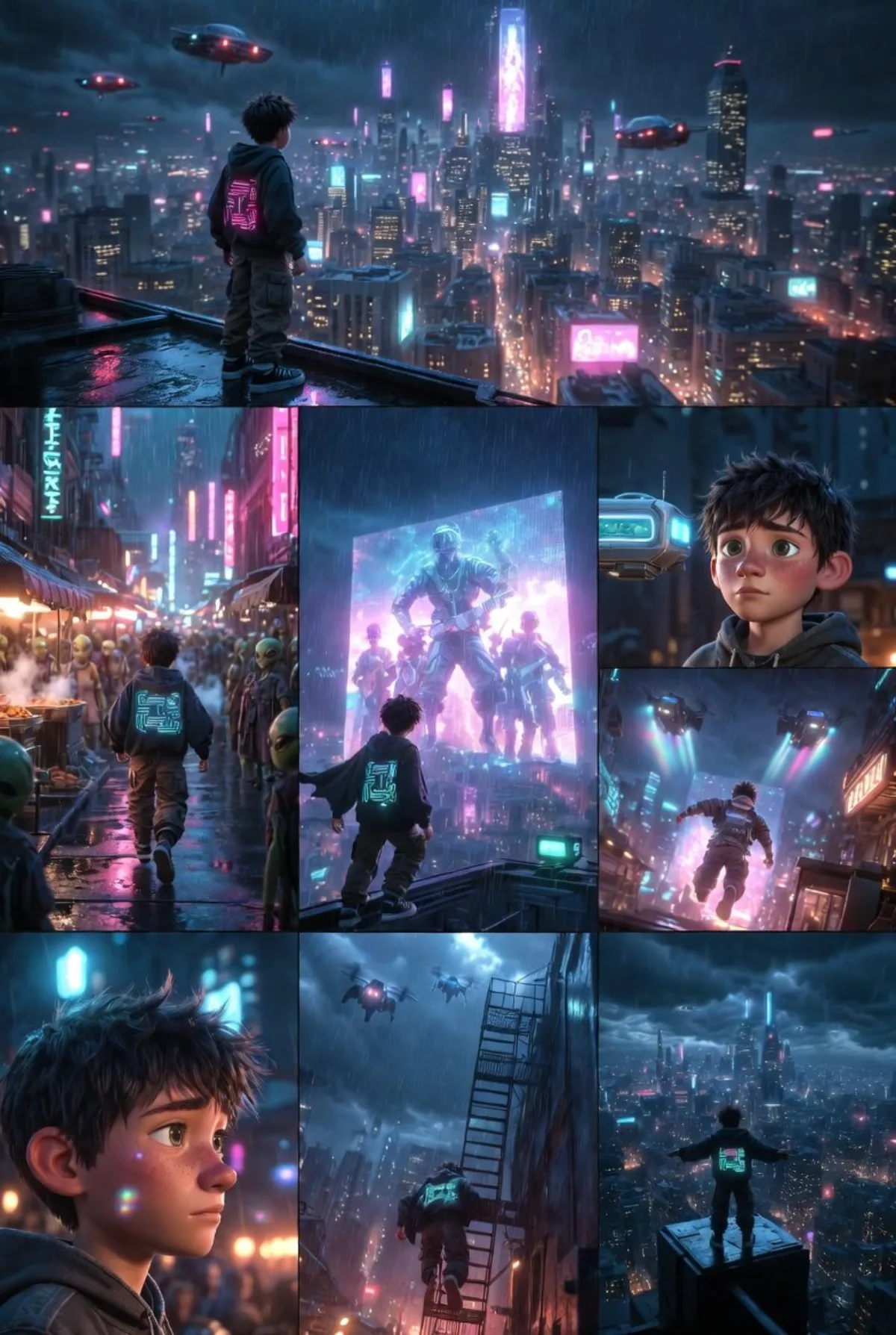
Ned的赛博朋克夜行:编辑级诠释 插画 2:3

Ned的赛博朋克夜行:编辑级诠释

高级 animationcinematicsci-fi
完整提示词
渲染要点:Is multi-image storytelling grids possible for Grok Imagine? It seems so. I got inspired by the Nano Banana pro+Claude posts ive been seeing of this trend. Tried this with Grok, about a pixar like style telling the story of Ned, cyberpunk setting, he walks through the city. Deets:

A single cohesive image divided into a clean 3x3 grid with thin white borders, telling a sequential story of a young Pixar-style cyberpunk protagonist named Ned traveling through a bustling futuristic city at night. Character consistency: Ned is a teenage boy with messy brown hair, large expressive green eyes, freckles, wearing a worn oversized hoodie with glowing circuit patterns, cargo pants, and sneakers, with the same exact appearance in every panel. Style: Highly detailed Pixar/Disney animation style, smooth CGI rendering, vibrant saturated colors, dramatic cinematic lighting with neon blues, pinks, and purples reflecting on wet surfaces, subtle lens flares, volumetric god rays from holograms and headlights. Grid layout and story progression (top left to bottom right, reading order): 1. Wide establishing shot: Ned standing on a rainy rooftop overlooking the massive cyberpunk city skyline filled with towering skyscrapers, flying cars, giant holographic billboards, and neon signs. 2. Medium shot: Ned leaping from rooftop to rooftop, cape-like hoodie flapping in the wind, determined expression. 3. Close-up: Ned landing on a lower platform, looking curious at a glowing street food vendor drone hovering nearby. 4. Wide shot: Ned walking through a crowded neon-lit street market, people and aliens around him, steam rising from food stalls, rain falling. 5. Medium shot: Ned stopping to watch a massive holographic advertisement of a futuristic band performing in mid-air. 6. Action shot: Ned running through an alley as police drones fly overhead, dramatic low-angle view. 7. Close-up: Ned's face in profile, reflective and thoughtful, city lights reflecting in his eyes. 8. Medium shot: Ned climbing a fire escape ladder toward a higher platform. 9. Final wide shot: Ned reaching the top, standing triumphantly with arms outstretched, the entire sprawling cyberpunk city glowing below him under a stormy sky. Aspect ratio 16:9, ultra-detailed, masterpiece, best quality.。尝试:低角度俯拍能给主体增加权威感、英雄感。
← 返回画廊

如何使用这条提示词

从复制粘贴到出图,只需 4 步。

1
复制提示词
点击上方「📋 复制完整提示词」按钮——剪贴板就有完整提示词了,「提示:」温馨贴士已自动剥离。
2
替换占位符
留意 [主体]、[品牌色]、{风格} 这样的占位符,换成你的具体内容效果更好。
3
选择宽高比
本提示词原始测试比例为 2:3。方图(1:1)适合社交分享,9:16 适合短视频/竖屏,16:9 适合 banner/封面。
4
粘贴到你的图像模型
可粘贴到 Nano Banana 2、GPT Image 2、Midjourney、Flux 2 或 DALL-E。每个模型理解会略有不同,多试 2-3 个挑最佳。

兼容的 AI 模型

本提示词在以下模型中均测试可用。点击任意徽章查看模型详情。

变体灵感

几个让这条提示词适配你的品牌/故事的小调整:

用同一构图测试三个宽高比(1:1、4:5、16:9),挑最适合你内容的画幅。
保持构图和光线不变,把主体换成你的产品、角色或品牌形象。
调整光线(黄金时刻 ↔ 工作室柔光箱 ↔ 蓝调时刻 ↔ 霓虹夜景)就能大幅改变情绪。
末尾加一个风格修饰词——例如 'shot on 85mm'、'film grain'、'编辑风 Vogue'、'电影感变形宽屏'.

常见问题

这条提示词在哪个 AI 模型上表现最佳?
四大主流模型(Nano Banana 2、GPT Image 2、Midjourney v7、Flux 2)都能很好地渲染本提示词。Nano Banana 2 在角色一致性和文字渲染方面最强;GPT Image 2 擅长多元素场景和文字排版;Midjourney 美学风格最有绘画感;Flux 2 是最强的开源选项。
这条提示词可以商用吗?
可以——AI Image Free 上所有提示词均可免费商用。卡片中的参考图是 AI 生成的视觉示例,你用这条提示词实际生成的图片归你所有(受你使用的具体 AI 模型服务条款约束)。
我怎么把这条提示词改造成我自己品牌的风格?
留意提示词中的占位符(如 [主体]、[颜色]、[品牌]),替换成你的具体内容。你也可以在提示词末尾追加自己的风格修饰词(例如「使用品牌色 #FF6B35 和 #2D3142」),打造品牌专属版本。